Consistent Style Unification
Eliminate color discrepancies across different sources by applying uniform filters, building a strong and coherent visual identity for your brand.
Replace manual color grading with automated style unification. Bulk apply professional cinematic filters to your video library for consistent branding in seconds.
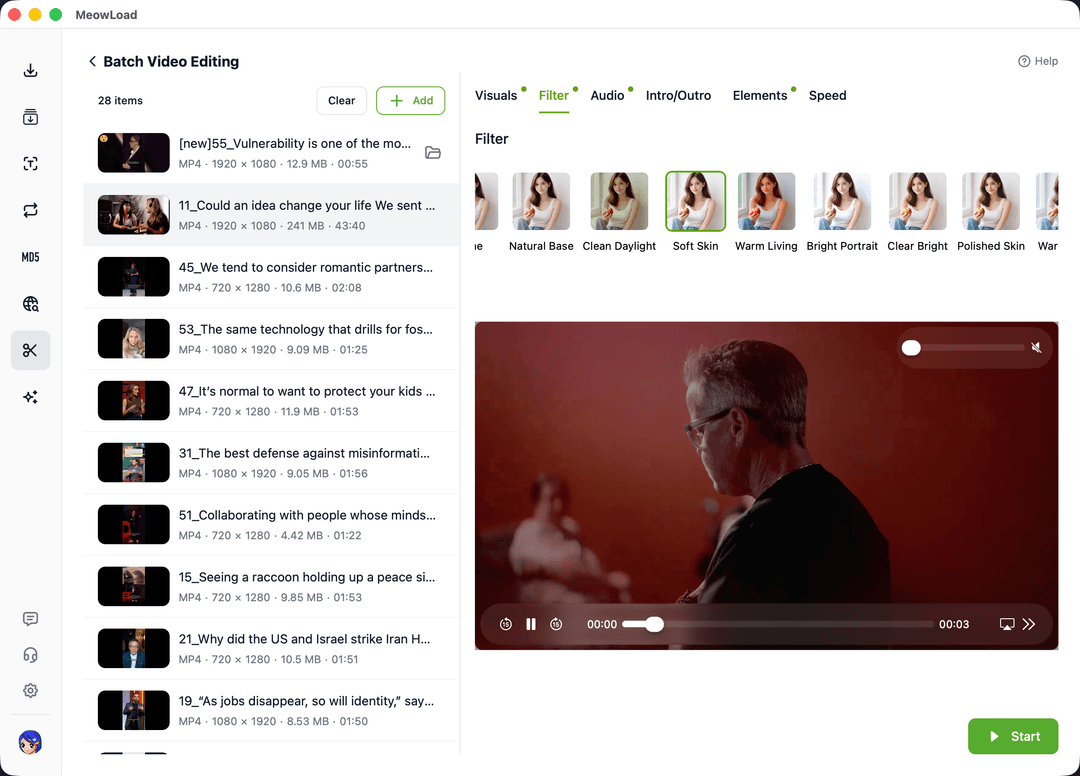
Standardize your video assets with professional-grade color grading and automated style application.
Eliminate color discrepancies across different sources by applying uniform filters, building a strong and coherent visual identity for your brand.
Leverage our powerful desktop engine to apply complex aesthetic enhancements to dozens of clips simultaneously, saving hours of manual labor.
From filmic tones to vibrant social media styles, find the perfect match for any content type and ensure your videos stand out with quality.
Streamline your post-production workflow by automating repetitive color and aesthetic adjustments.
Select multiple local video files or entire folders to load into the batch processing queue instantly.
Browse our library of professional presets and select your target style with a live preview of the outcome.
Click start to process all tasks automatically, saving style-consistent videos to the original directory.
Combine multiple automated tools to create a professional and highly efficient content production line.
Standardize aspect ratios across all filtered clips for cross-platform compatibility.
Protect your newly styled content with consistent logos or text overlays.
Tighten up your edits by removing dead air from all videos in bulk.
Strip original audio from multiple clips to prepare for unified background music.
Start your batch color grading journey today and transform hours of tedious editing into seconds of automated style unification.